
Chatbot knowledge base
Unlock your chatbot's potential with our guide on the Teaching Step, including surveys, custom Q&A, and knowledge base management.
🎓 Teaching e Knowledge Base - Crafter.ai
This is the complete guide to building your chatbot's intelligence through the Teaching Step, which includes guided surveys, custom Q&A, Flow Designer, and knowledge base management.
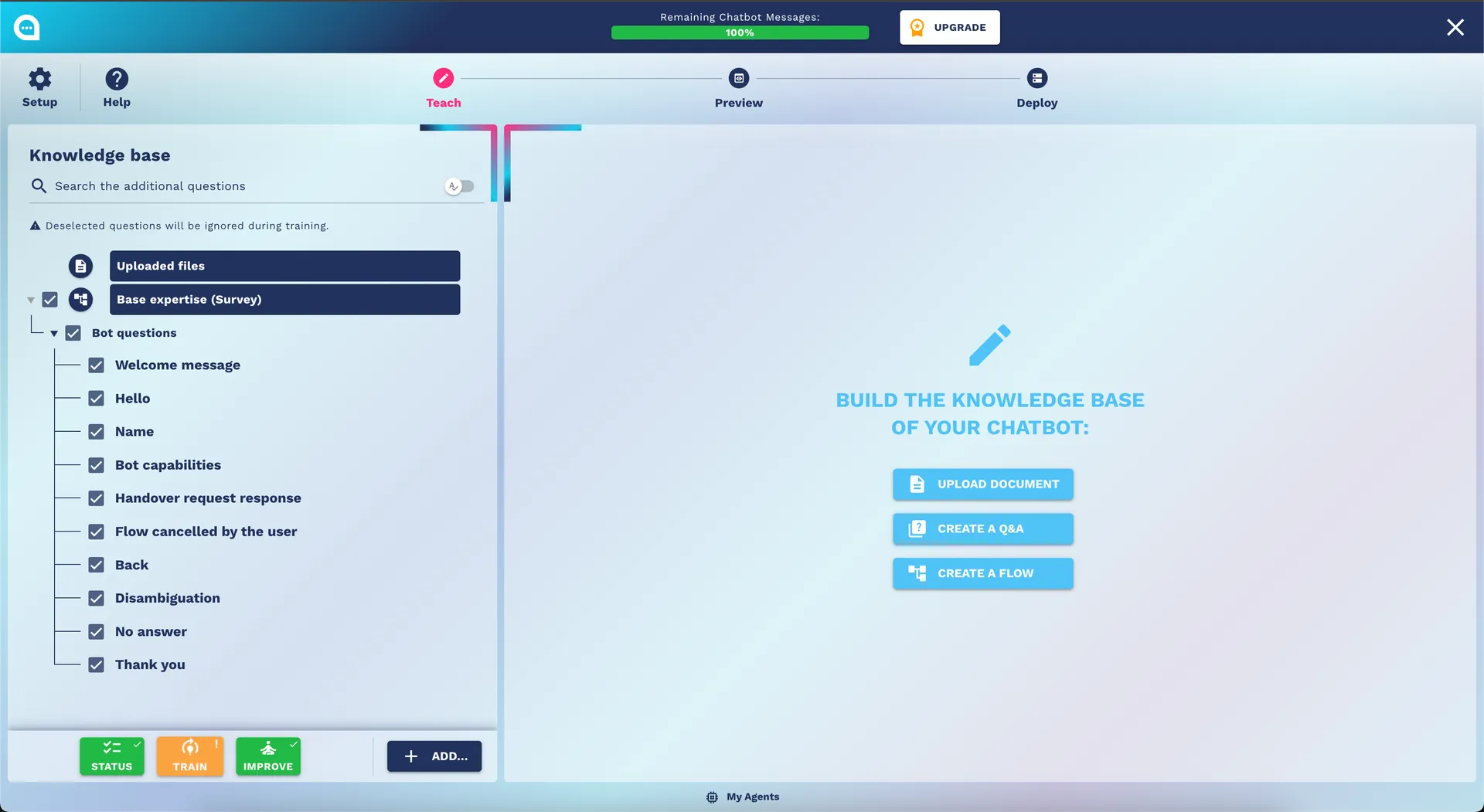
🎯 Overview of the Teaching Step
The Teaching Step is the heart of your chatbot. Here you define:
- Base Expertise: Fundamental skills through guided surveys
- Custom Expertise: Personalized and specific Q&A
- Flow Designer: Complex conversations and advanced workflows
- Knowledge Base: Documents and external resources
- Improve: Analysis and performance optimization
📋 Base Expertise (Guided Survey)
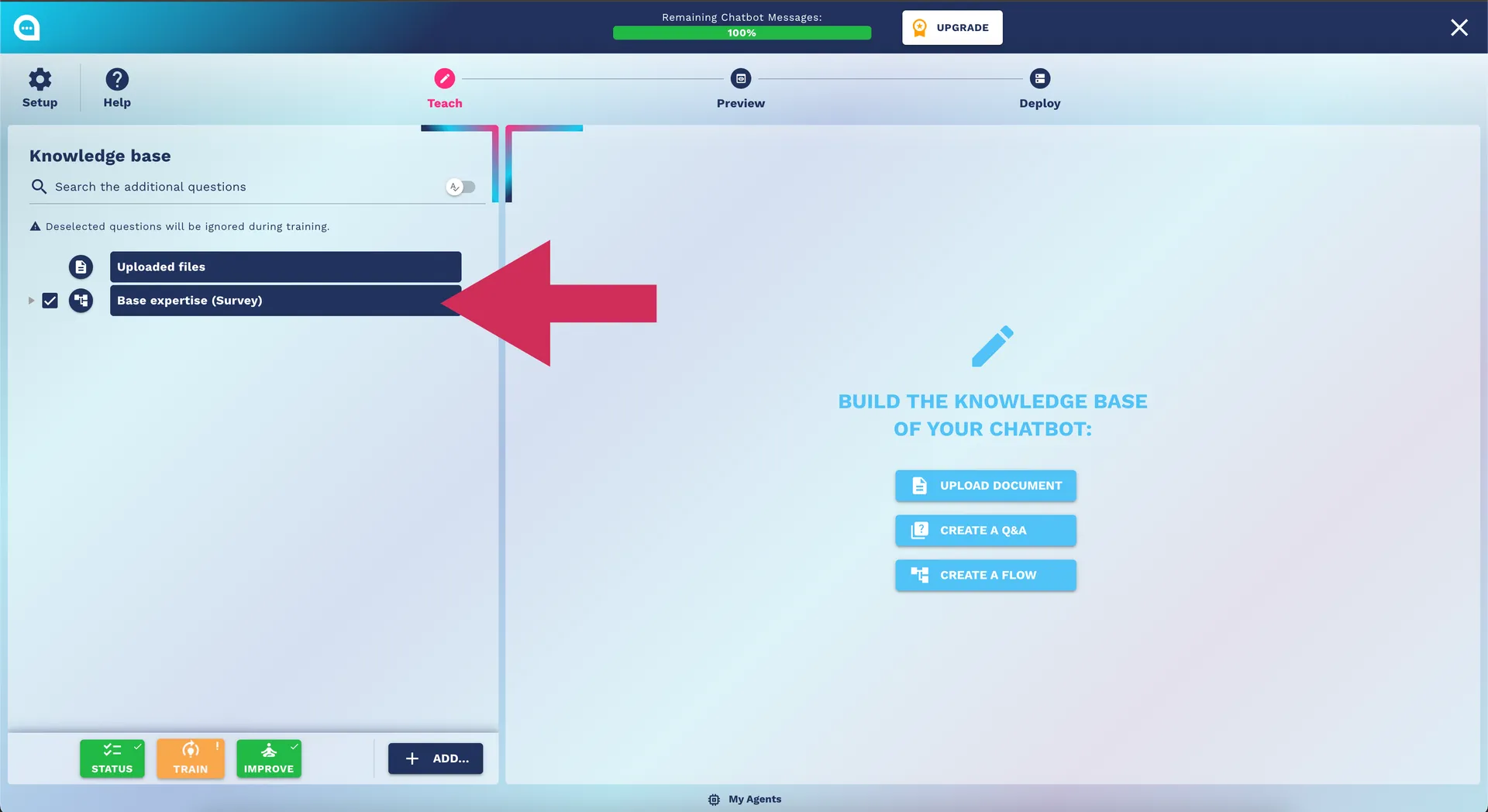
What is the Guided Survey
The survey is a smart questionnaire that analyzes your business and automatically generates an initial knowledge base for the chatbot.
Survey Categories
1. Business Information
Typical questions:
- Industry
- Company size
- Target customers
- Main sales channels
Example response:
Industry: Clothing e-commerce
Size: SME (10-50 employees)
Target: Young adults 18-35 years
Channels: Website, Social media, Marketplace
2. Products and Services
Typical questions:
- Main product/service catalog
- Price ranges
- Distinctive features
- Sales processes
Best Practices for Responses:
- ✅ Be specific: "We sell t-shirts, jeans, and casual accessories"
- ✅ Include details: "Price ranges €20-150, focus on sustainability"
- ❌ Avoid generalities: "We sell clothes"
3. Customer Support
Typical questions:
- Current support channels
- Service hours
- Most common issues
- Average response time
4. Business Processes
Typical questions:
- Sales workflow
- Return/refund management
- Company policies
- Standard procedures
How to Effectively Complete the Survey
Preparation
- Gather information: Existing FAQs, business documents, support statistics
- Involve the team: Consult sales, marketing, customer service
- Think about use cases: What questions do customers ask most often?
During Completion
- Complete answers: Use full sentences, not single words
- Concrete examples: Include real examples of products/services
- Natural language: Write as you would speak to a customer
- Operational details: Hours, prices, specific procedures
Example of a Complete Response
❌ Incorrect: "We sell shoes" ✅ Correct: "We sell sports and casual shoes for men and women, from brands like Nike, Adidas, and our private label. Price range €50-200. Specializing in running and urban lifestyle. Available sizes 36-48, with a free home trial service."
🎯 Custom Expertise (Personalized Q&A)
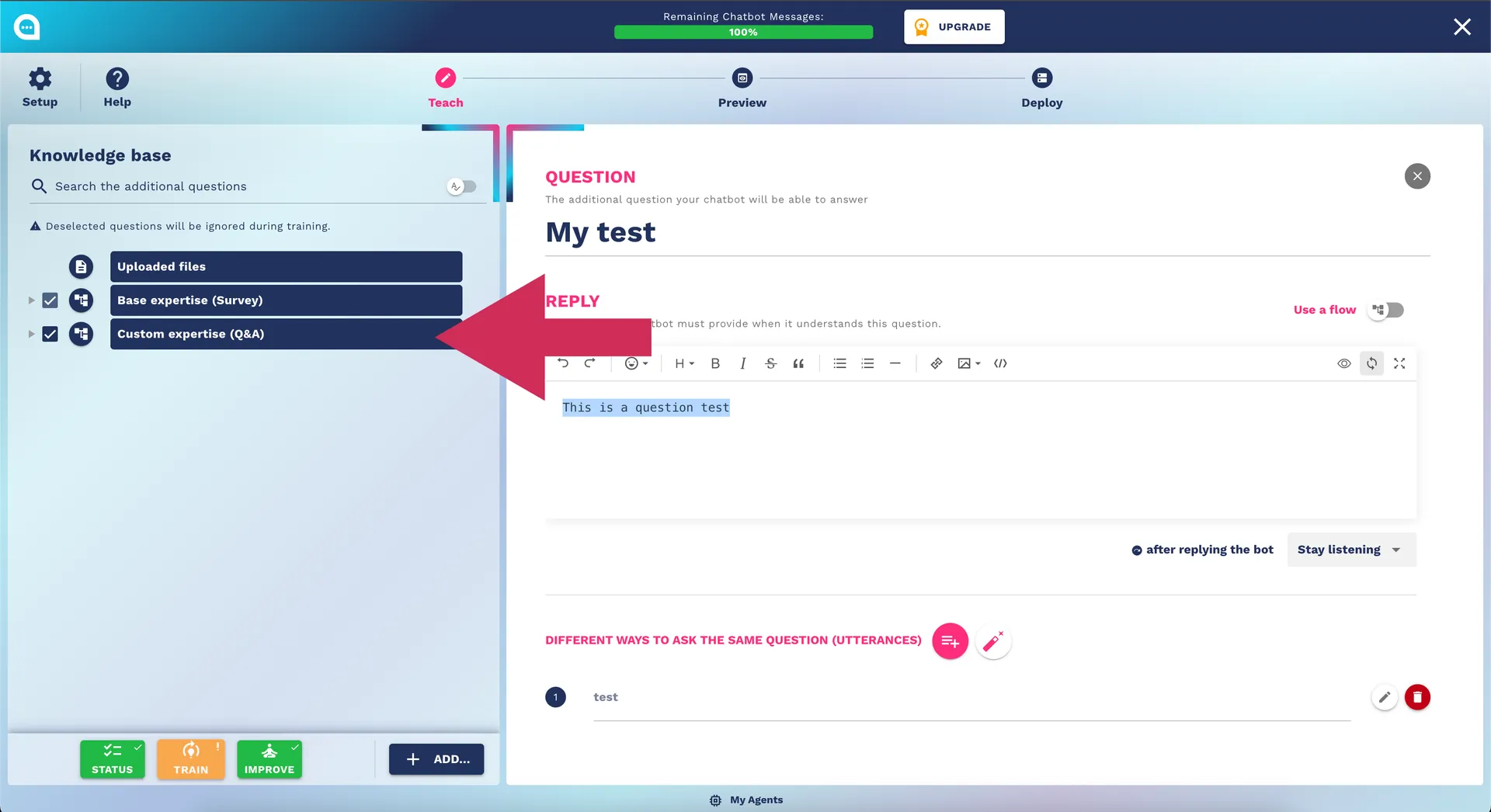
Structure of Q&A
Main Question
The question that the user might ask exactly.
Best Practices:
- Use the customer's natural language
- Include regional/slang variations
- Think about how a real customer would phrase the question
Utterances (Variations)
Different ways to ask the same question.
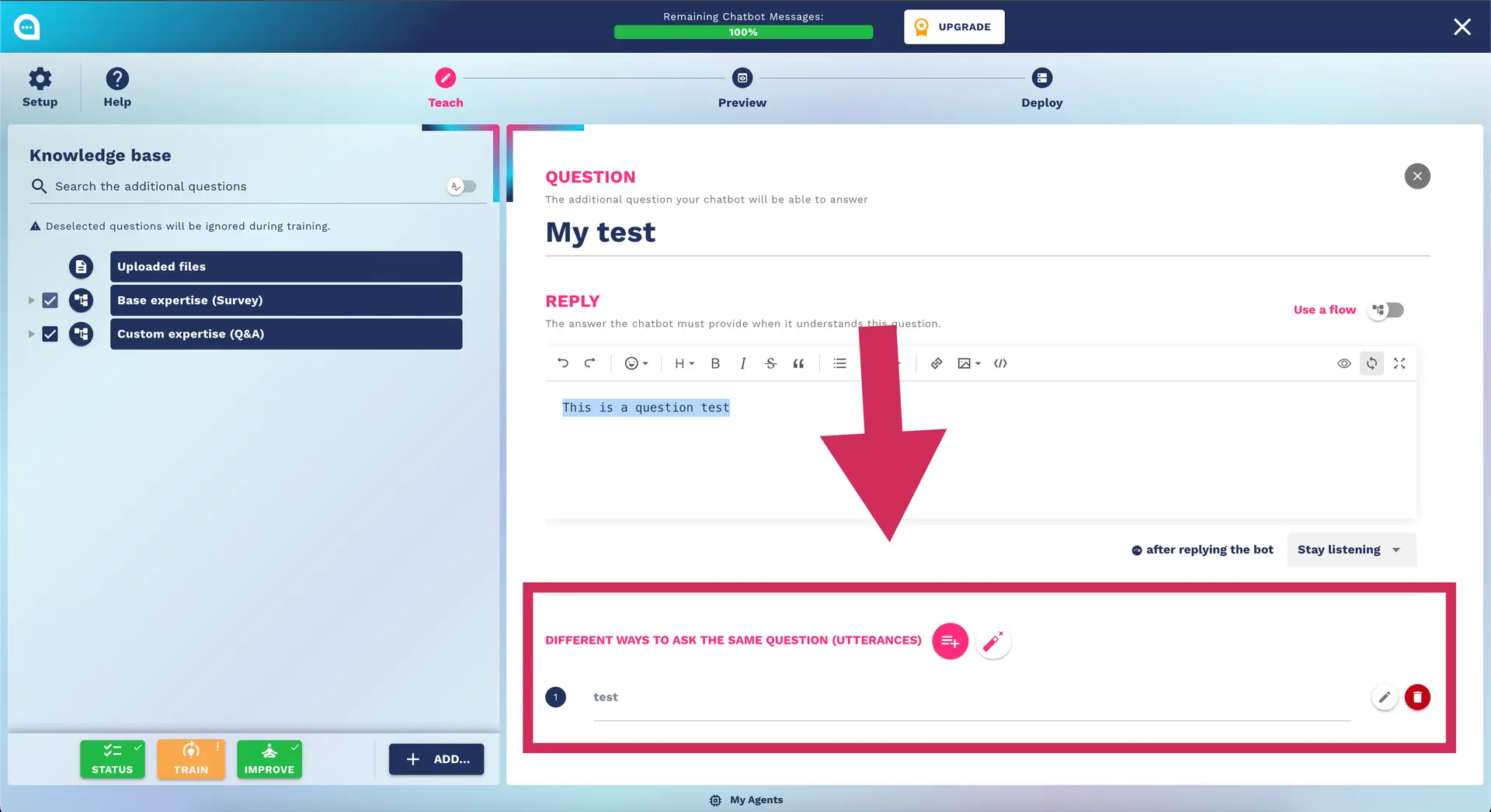
Complete example:
Main question: "How much does shipping cost?"

Utterances:
- Shipping cost
- Delivery price
- How much do I pay for delivery?
- Shipping rates
- Transport costs
- Shipping fees
- Delivery cost
- How much does the courier cost?
Answer
The response that the chatbot will provide.
Elements of a good answer:
- ✅ Complete information
- ✅ Friendly language
- ✅ Call-to-action when appropriate
- ✅ Updated information
Example of a structured response:
Shipping costs:
• 📦 Standard shipping (3-5 days): €4.90
• 🚀 Express shipping (1-2 days): €9.90
• 🆓 FREE shipping for orders over €50

We deliver throughout Italy with express courier.
Want to see our products? 👉 [Catalog Link]
Types of Advanced Q&A
Q&A with Variables (use flow designer)
For personalized responses with placeholders.
Question: "When will my order arrive?"
Answer: "Hello {{user_name}}! Your order #{{order_number}}
          will arrive {{estimated_delivery_date}}.
          You can track it here: {{tracking_link}}"
Conditional Q&A (use flow designer)
For different responses based on context.
IF current_time IN opening_hours:
  "Our operators are available now! Would you like to be transferred?"
ELSE:
  "Our operators are available from 9 AM to 6 PM.
   Can I help you or would you prefer to leave a message?"
Q&A with Rich Media
Include images, videos, links.
Question: "How do I assemble product X?"
Answer: "Here is the tutorial video for assembling product X:
          📹 [YouTube Video]
          📄 [PDF Instructions]
          🛠️ Need help? Contact our technical support!"
🌊 Flow Designer (Advanced Conversations)
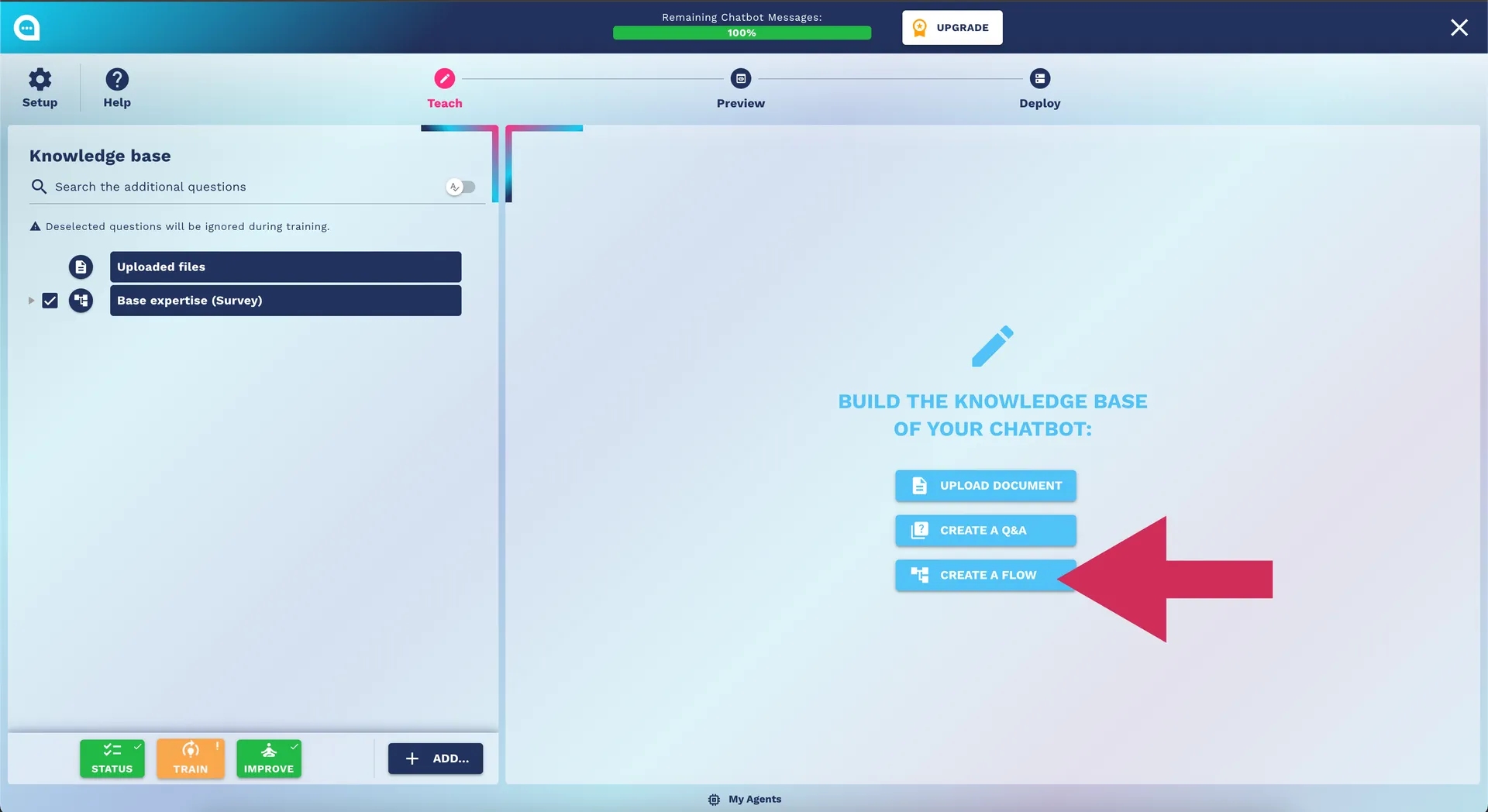
What is the Flow Designer
The Flow Designer is a visual editor for creating complex conversations with conditional logic, data collection, and integration with external systems.
Basic Elements of the Flow
User Nodes (Input)
- User Says: The user says something
- User Replies: The user responds to a specific question
Bot Nodes (Output)
- Bot Replies: The bot responds with a message
- Bot Asks: The bot asks a question
- Bot Stops: The bot ends the conversation
Logical Nodes
- Condition Check: Checks a condition
- Fork Condition: Forking based on multiple conditions
Action Nodes
- Bot Calls API: Call to external services
- Bot Runs Code: Execute custom code
- Mail Lead: Send email with collected data
Example of a Complete Flow: Appointment Booking
graph TD
    A[User Says: "I want to book"] --> B[Bot Asks: "For which service?"]
    B --> C[User Replies]
    C --> D{Check Service Available}
    D -->|Available| E[Bot Asks: "What day do you prefer?"]
    D -->|Not Available| F[Bot Replies: "Service not available"]
    E --> G[User Replies: Date]
    G --> H[Bot Calls API: Check Calendar]
    H --> I{Slot Available?}
    I -->|Yes| J[Bot Asks: "Name and phone?"]
    I -->|No| K[Bot Replies: "Slot not available"]
    J --> L[User Replies: Data]
    L --> M[Mail Lead: Send Booking]
    M --> N[Bot Replies: "Booking confirmed!"]
Configuring Advanced Nodes
Bot Calls API
For integrations with external systems.
Configuration:
{
  "url": "https://api.example.com/bookings",
  "method": "POST",
  "headers": {
    "Authorization": "Bearer {{api_token}}",
    "Content-Type": "application/json"
  },
  "body": {
    "service": "{{selected_service}}",
    "date": "{{selected_date}}",
    "customer": "{{customer_name}}"
  }
}
Condition Check
For complex conditional logic.
Examples of conditions:
• {{current_time}} > "18:00" → Out of hours
• {{user_location}} == "Milan" → Service area
• {{order_value}} >= 100 → Free shipping
• {{user_type}} == "premium" → Access to advanced features
Slot Management
To collect and maintain information during the conversation.
Example of Slot:
Slot: customer_info
├── name (required)
├── email (required, email validation)
├── phone (optional, Italian format)
└── notes (optional, max 200 characters)
Best Practices for Flow Design
1. Planning
- Map the workflow: Before starting, draw the flow on paper
- Identify critical points: Where can problems arise?
- Fallback paths: Always plan alternatives in case of error
2. User Experience
- Clear messages: Every question should be understandable
- Limited options: No more than 3-4 choices at a time
- Constant feedback: The user should always know where they are
3. Error Management
- Timeout handling: If the user does not respond
- Invalid input: Handling invalid inputs
- API failures: What to do if an external service does not respond
4. Testing
- Happy path: Test the main flow
- Edge cases: Test limit scenarios
- Error paths: Test all failure points
📚 Knowledge Base and Document Upload
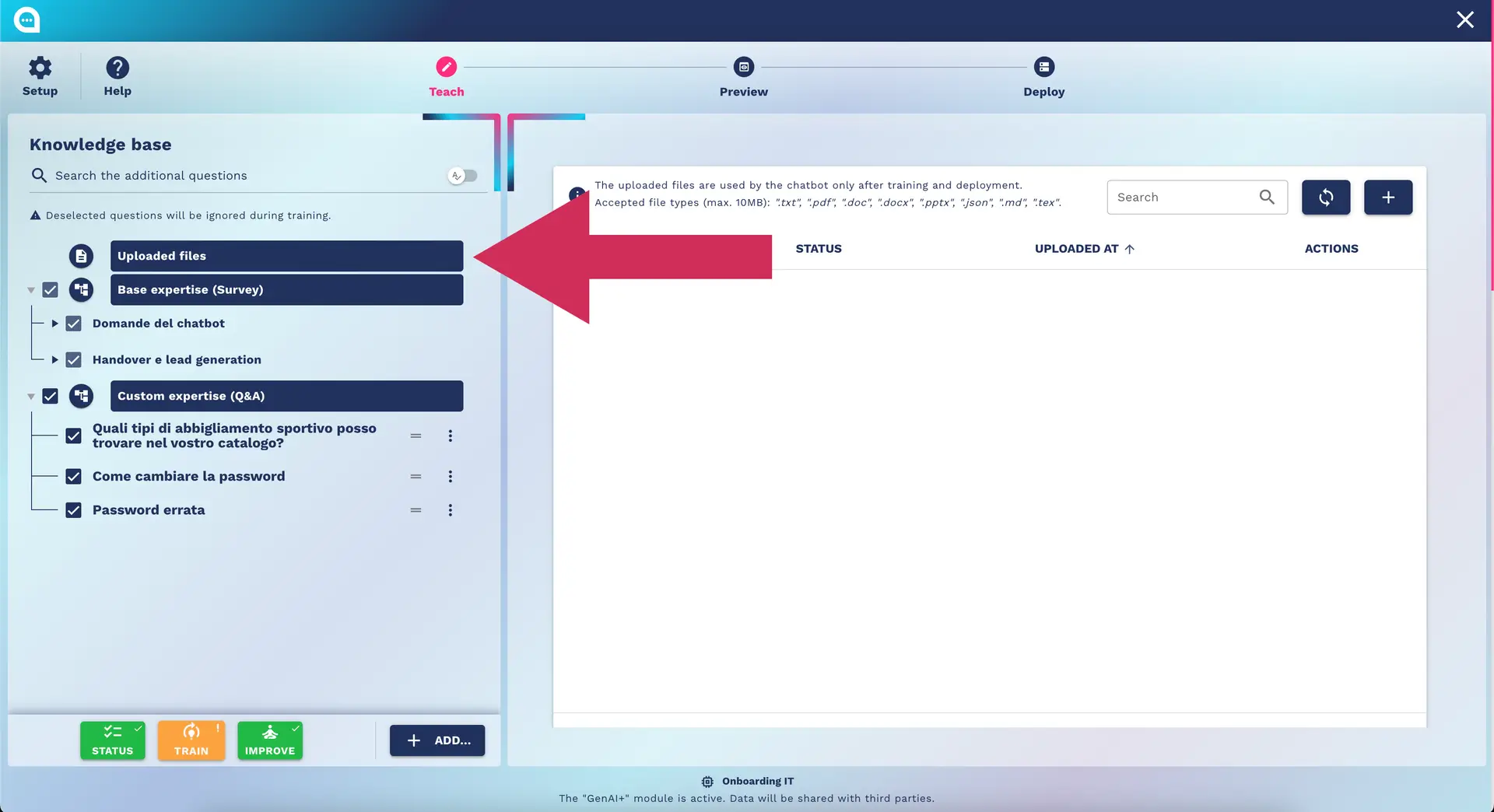
Supported Formats
Text Documents
- PDF: Up to 50MB, automatic text extraction
- DOCX/DOC: With formatting preservation
- TXT: Plain text, any size
- RTF: Rich Text Format
Structured Documents
- Excel/CSV: For tabular data (FAQs, catalogs)
- JSON: For structured data and API responses
- XML: For feeds and structured data
Web Content
- HTML: Saved web pages
- URL Scraping: Automatic import from websites
- RSS/Atom: Automatic feeds
Upload Process
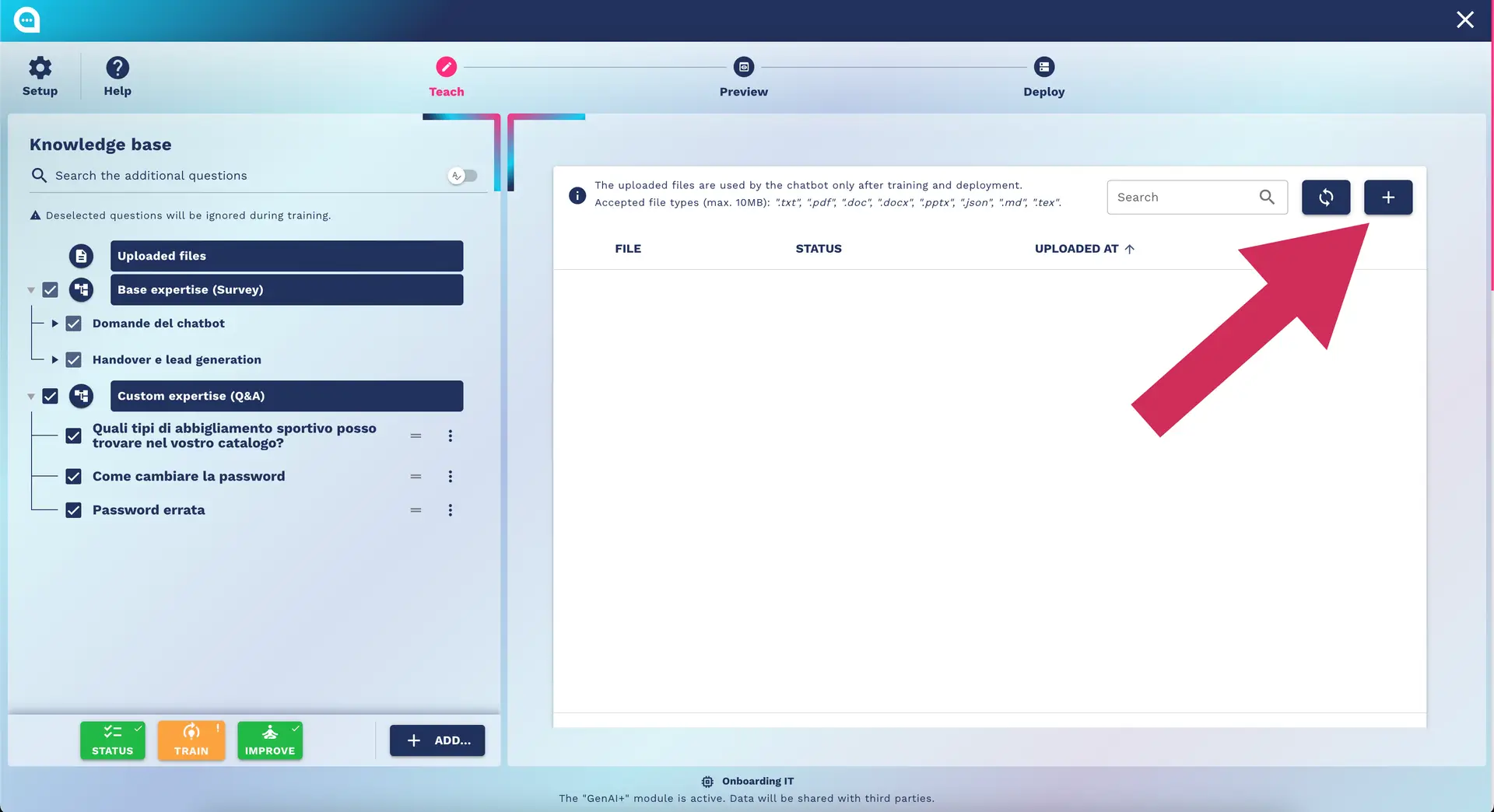
1. Document Preparation
Optimization for AI:
- ✅ Clear structure: Use headings, subheadings, lists
- ✅ Natural language: Avoid excessive technical jargon
- ✅ Updated information: Check dates and prices
- ✅ Remove irrelevant content: Footers, headers, advertisements
2. Upload and Processing
1. File selection → 2. Upload → 3. AI Processing → 4. Review → 5. Publishing
Processing times:
- PDF 10 pages: ~2-3 minutes
- DOCX 50 pages: ~5-8 minutes
- Excel 1000 rows: ~3-5 minutes
3. Review and Optimization
After uploading, check:
- Correct extraction: Was the text interpreted correctly?
- Categorization: Did it end up in the right folder?
- Relevance: Is the information useful for the chatbot?
Automatic Content Management
Auto-Categorization
AI automatically categorizes content:
📄 "Returns Guide.pdf" → 📁 Customer Support
📄 "Spring Catalog.xlsx" → 📁 Products
📄 "Shipping FAQ.docx" → 📁 Orders and Shipping
Automatic Updates
- Monitoring URLs: Periodic checks of websites
- Version control: Tracking document changes
- Automatic sync: Updating knowledge base
Duplicate Detection
The system automatically identifies:
- Duplicate content
- Obsolete information
- Conflicts between different sources
🔍 Improve Section (Optimization)
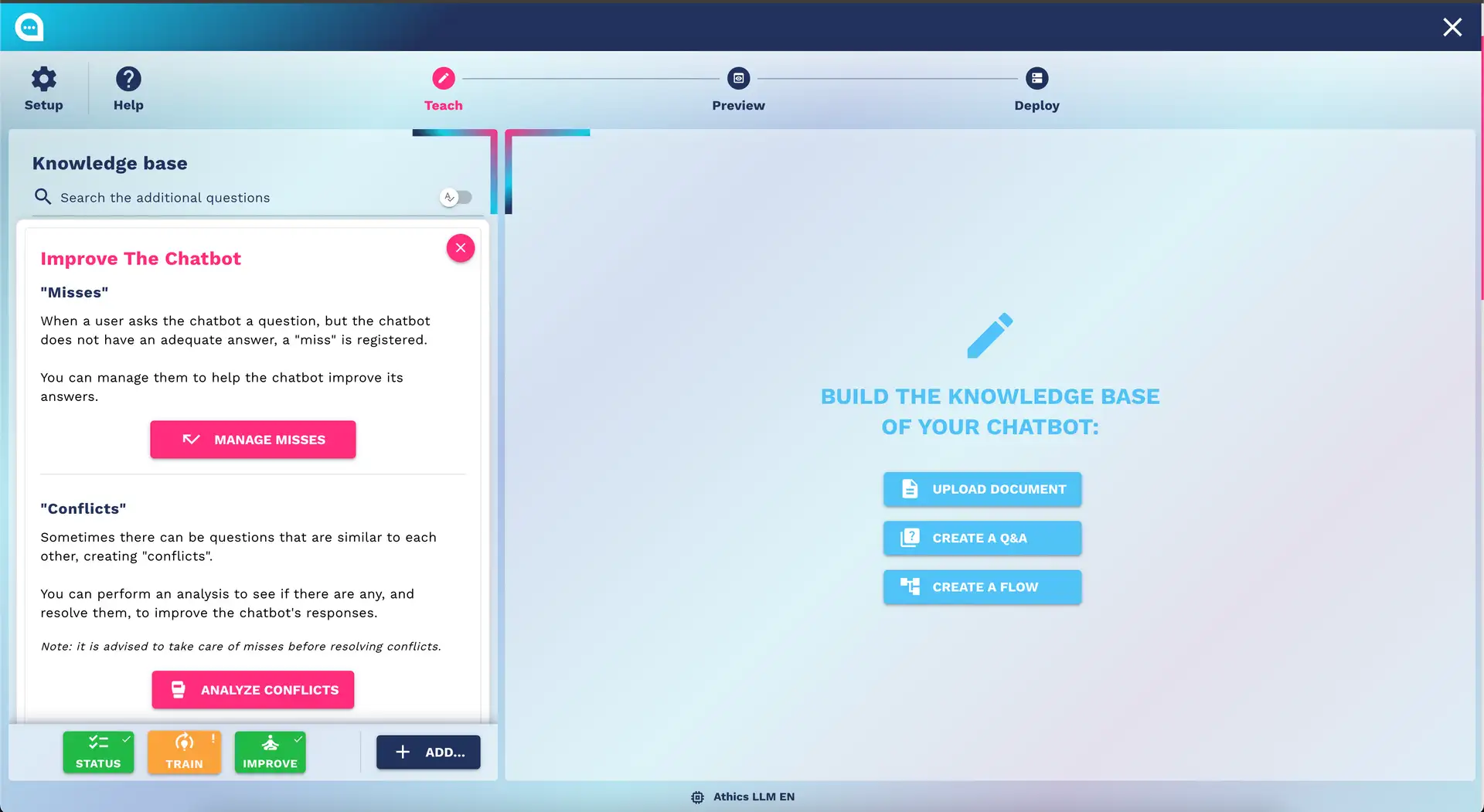
Analysis of Missed Conversations
What are "Misses"
Conversations where the chatbot could not respond adequately.
Misses Dashboard
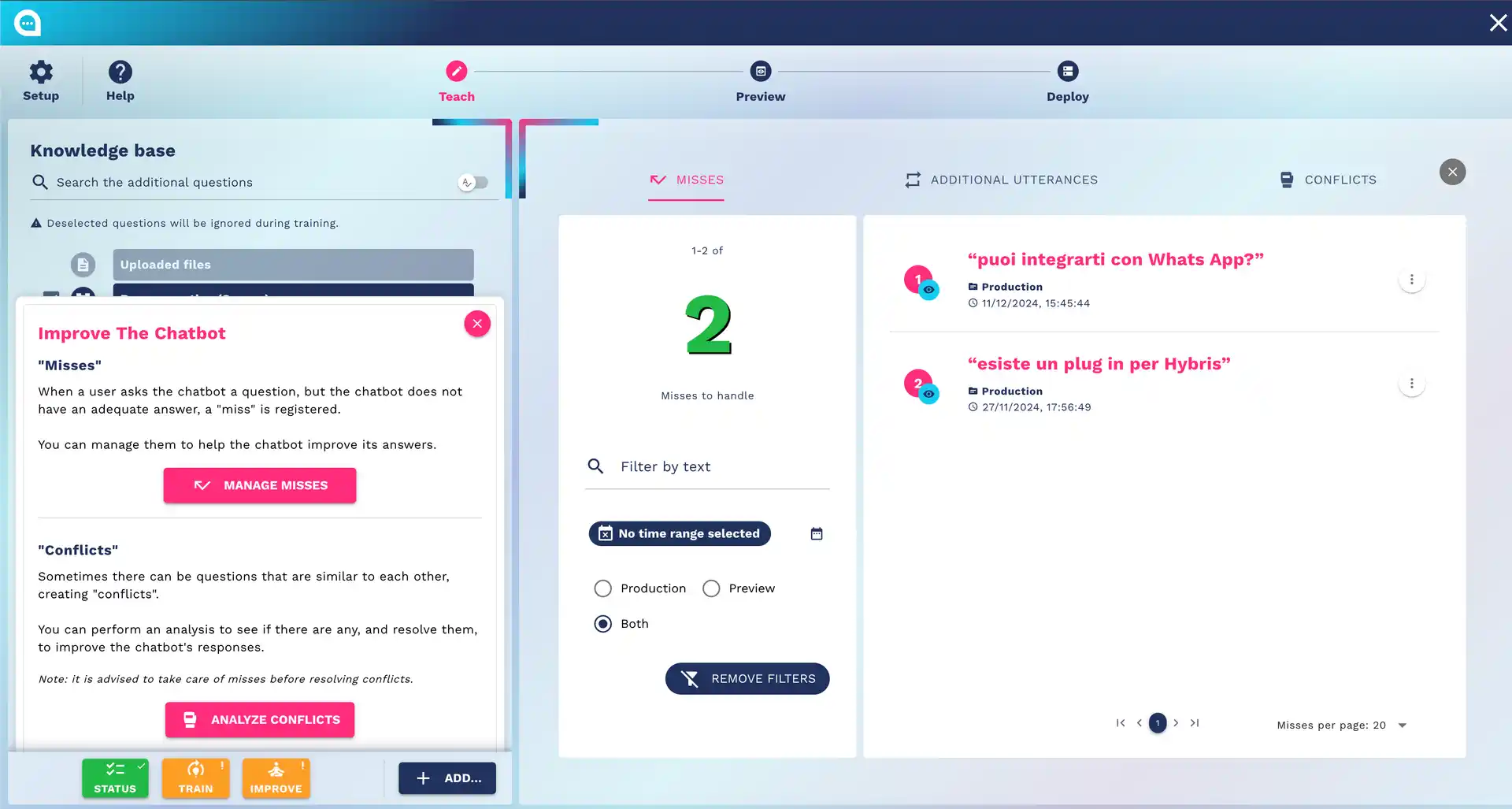
Displayed metrics:
- Total number of misses
- Temporal trends
- Most frequently unanswered questions
- User satisfaction scores
Resolution Workflow
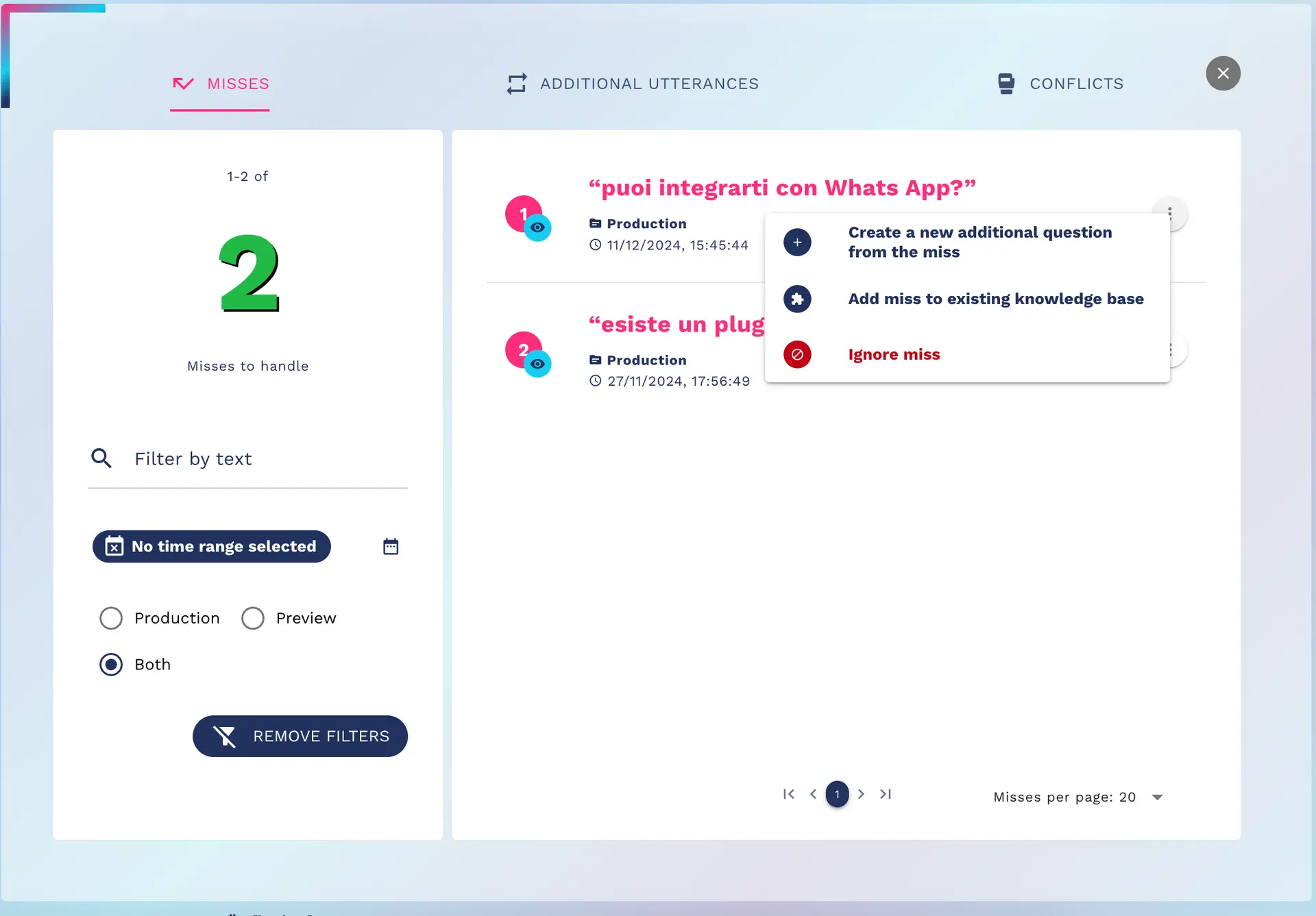
1. Review conversation → 2. Identify knowledge gaps → 3. Create Q&A/Flow → 4. Train → 5. Test
Conflict Analysis
What is a Conflict
When two or more Q&A could answer the same user question.
Types of Conflicts
- Semantic overlap: Similar questions, different answers
- Ambiguity: A question can have multiple interpretations
- Contradictions: Conflicting information
Conflict Resolution
Strategies:
- Merge: Combine similar Q&A
- Clarification: Add clarification questions
- Priority: Define priority among answers
- Context: Use conversation context
Analytics and Optimization
Key Metrics
- Success Rate: % of resolved conversations
- User Satisfaction: User ratings
- Response Time: Average response time
- Handover Rate: % of transfers to humans
Optimization Loop
graph LR
    A[Data Analysis] --> B[Identify Problems]
    B --> C[Implement Solutions]
    C --> D[Training]
    D --> E[Deploy]
    E --> F[Monitor Results]
    F --> A
🎯 General Best Practices
Content Strategy
- Quality over Quantity: Better a few perfect Q&As than many mediocre ones
- User-Centric: Always from the user's perspective
- Iterative Improvement: Continuous improvement based on data
- Consistency: Consistent tone of voice and information
Training Strategy
- Regular Training: At least weekly for active chatbots
- Incremental Updates: Small frequent updates vs. large refactors
- A/B Testing: Test different versions of responses
- Backup Strategy: Always keep previous versions
Maintenance Routine
- Weekly: Review new misses and conflicts
- Monthly: Complete performance analysis
- Quarterly: Strategic review of the knowledge base
- Yearly: Complete review of content and workflows
✅ Complete Teaching Checklist
Base Expertise
- Survey completed 100%
- All questions with detailed answers
- Updated business information
- Documented business processes
Custom Expertise
- At least 20 main Q&As created
- Utterances added for each Q&A
- Organization in logical folders
- Coverage of main topics
Knowledge Base
- Key documents uploaded
- Processing completed without errors
- Categorization verified
- Updated content
Flow Designer
- Main workflows implemented
- Testing all paths
- Error management configured
- API integrations tested
Optimize & Improve
- Initial analysis of misses completed
- Main conflicts resolved
- Baseline metrics established
- Monitoring process activated
🔗 Next Steps
After completing the Teaching:
- [Preview and Testing]
- [Advanced Flows]
- [Analytics Setup]
⏱️ Estimated time for complete Teaching: 4-8 hours for a basic chatbot
🎯 Goal: A chatbot that correctly answers the main questions of your business